

The Foundation of Connected Apartment Living
Finding apartments with reliable internet is a key step for modern living. For those seeking a strong internet connection, consider these essential points:
- Prioritize Fiber Optic Connections: These offer the fastest and most stable speeds where available.
- Check Building Restrictions: Some apartments have exclusive contracts with a single internet provider.
- Inquire About Infrastructure: Understand the building's wiring and internet setup.
- Evaluate Wi-Fi Equipment: Ask about the quality and age of modems and routers provided.
- Distinguish Service Types: Understand if internet is building-wide Wi-Fi or individual apartment service.
- Verify Actual Speeds: Check the real-world performance at the specific address, not just advertised rates.
Finding apartments with reliable internet has become a top priority for apartment seekers. A strong internet connection is now as vital as any other utility in a home.
Modern life relies heavily on digital connectivity. Remote work, seamless streaming, competitive online gaming, and efficient smart home devices all demand consistent, fast internet.
However, internet quality varies greatly between apartment buildings. Factors like construction materials, internet service provider agreements, and even the equipment used can impact your online experience.
This guide helps understand what makes apartment internet reliable. It outlines how to steer the complexities to find an apartment that supports all digital needs.
Understanding Connection Types in Apartments with Reliable Internet
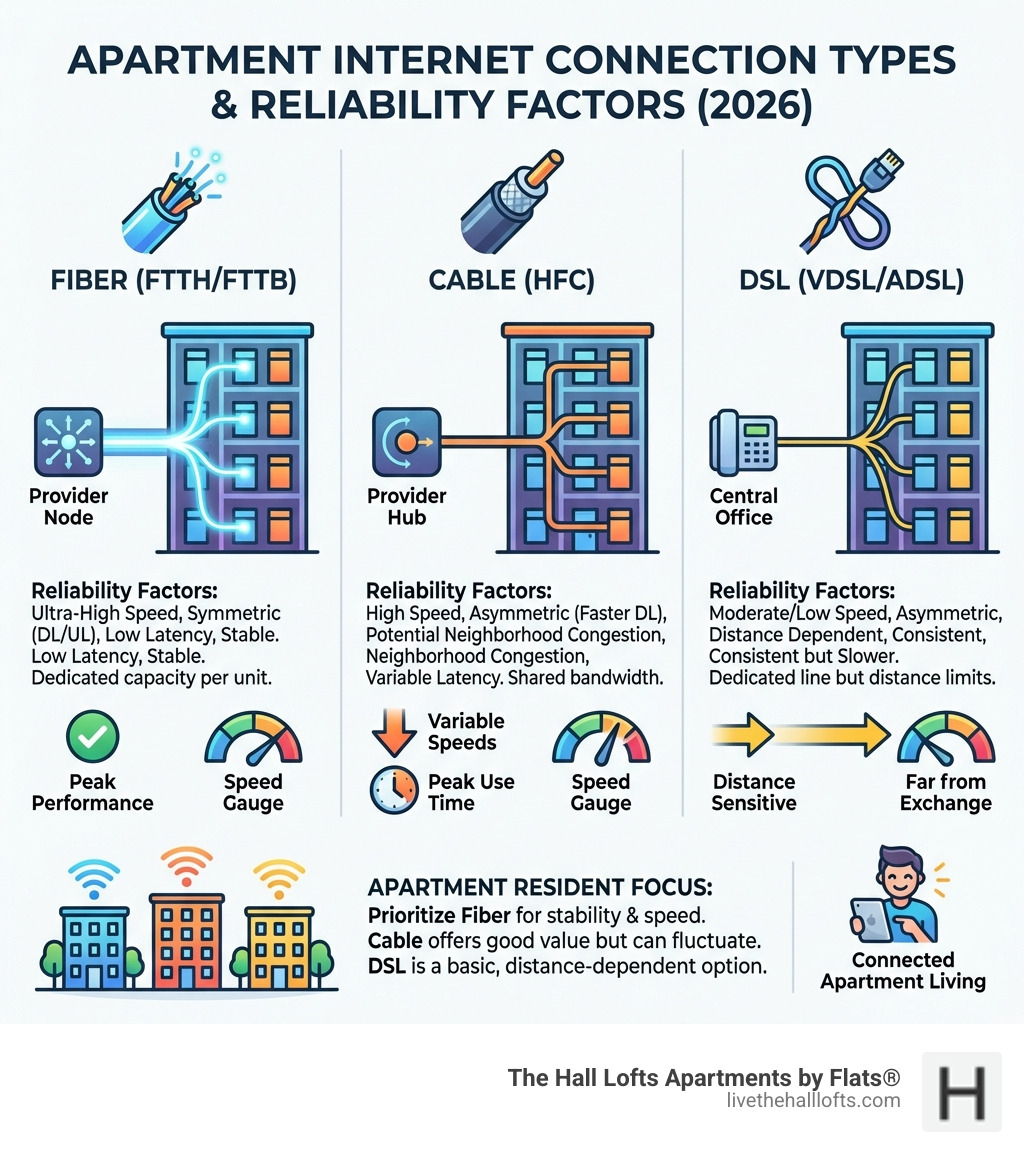
When searching for apartments with reliable internet, the technology bringing data into the building is the most critical factor. Not all connections are created equal, and the type of wiring available often dictates the maximum performance possible.
Fiber-to-the-Home (FTTH)
Fiber-optic internet is the gold standard for modern apartment living. It uses light signals sent through glass strands to transmit data at incredible speeds. In Minneapolis, many newer or renovated buildings are adopting this technology. The primary advantage of fiber is its ability to provide symmetrical speeds—meaning your upload speed is just as fast as your download speed. This is a game-changer for anyone who frequently sends large files or participates in high-definition video calls.
Cable Internet
Cable is the most common connection found in apartments. It uses the same coaxial copper wires that deliver cable television. While cable offers excellent download speeds—often reaching up to 1,000 Mbps—the upload speeds are typically much lower than fiber. For most residents, cable is highly dependable and perfectly suited for streaming 4K video and general browsing.
DSL (Digital Subscriber Line)
DSL runs over traditional telephone lines. While it is widely available, it is generally the least reliable option for high-bandwidth households. Speeds are significantly slower than cable or fiber and can degrade based on the distance from the provider's central office. If a building only offers DSL, it may struggle to support multiple heavy users simultaneously.
Understanding these differences helps in making an informed choice. For more details on navigating these options, resources like Internet for Apartments: How to Get Wi-Fi Where You Live provide excellent context on choosing between preferred building providers and independent setups.
Bandwidth for Remote Work and Gaming
The amount of bandwidth required depends heavily on lifestyle. A single person streaming movies has very different needs than a household with two remote workers and a dedicated gamer.
- Streaming: Standard HD streaming requires about 10–25 Mbps per stream. If moving to 4K, that requirement jumps significantly.
- Video Conferencing: For smooth Zoom or Teams calls without "freezing," 5–10 Mbps of dedicated upload speed per user is recommended.
- Gaming: While gaming doesn't use massive amounts of data, it requires low latency (ping). A stable connection is more important than raw speed here to prevent "lag."
| Activity | Recommended Download Speed | Recommended Upload Speed |
|---|---|---|
| Basic Web Browsing | 5-10 Mbps | 1-2 Mbps |
| HD Video Streaming | 10-25 Mbps | 3-5 Mbps |
| Working From Home (Video Calls) | 50-100 Mbps | 10-20 Mbps |
| Online Gaming | 50-100 Mbps | 5-10 Mbps |
| Heavy Usage (4K + Multiple Users) | 300+ Mbps | 50+ Mbps |
Infrastructure and Building Material Impacts
The physical structure of an apartment building plays a surprising role in internet reliability. Even the fastest fiber connection can be hindered by the walls around you.
Many Minneapolis lofts and renovated warehouses feature beautiful, thick materials like concrete and brick. While these are excellent for soundproofing, they are notorious for blocking Wi-Fi signals. Metal studs used in modern partitions can also create a "Faraday cage" effect, reflecting signals and creating dead zones within a single unit.
The layout of the apartment matters just as much as the materials. A long, narrow floor plan might mean the signal from a router in the living room barely reaches a bedroom at the far end. Strategic placement of hardware is essential. Placing a router in a central, open location—rather than tucked inside a cabinet or behind a television—can significantly improve coverage.
Smart Technology Requirements for Apartments with Reliable Internet
As buildings become more technologically advanced, the demand on the internet infrastructure increases. Apartments with reliable internet are often the backbone for smart building features.
Modern residents often use IoT (Internet of Things) devices such as Smart Climate Control systems and connected lighting. These devices require a stable, "always-on" connection to function correctly. Furthermore, many upscale apartment amenities in Minneapolis now include virtual concierges or smart access systems that rely on the building's digital network. If the internet is spotty, these luxury features can quickly become frustrations.
Managed Wi-Fi vs. Individual Service Providers
There are two primary ways internet is delivered to residents: building-wide managed Wi-Fi or individual accounts with a service provider.
Managed Building Wi-Fi
In this scenario, the property management provides internet as a building-wide amenity. Residents typically log in to a portal, similar to a hotel. The advantage is convenience—internet is active the moment you move in. High-quality managed systems provide performance guarantees and private VLANs to ensure security. However, if the system is poorly designed, peak usage times (like 7:00 PM when everyone starts streaming) can lead to significant slowdowns.
Individual Service Providers
This is the traditional model where each resident signs a contract with a provider like a cable or fiber company. This allows for more control over speed tiers and hardware. Residents in locations like Brooklyn or Minneapolis often prefer this for the ability to customize their plan.
Exclusive Provider Agreements
It is common for apartment buildings to have exclusive agreements with a single internet service provider (ISP). These "marketing agreements" can sometimes limit your choices. When touring a building, it is important to ask if you are required to use a specific provider or if the building is "open access," allowing you to choose from any provider that services the area.
Essential Equipment for High-Performance Connectivity
Even with the best service plan, outdated hardware can throttle your speeds. The modem and router are the "engines" of your home network.
- WiFi 6 (802.11ax): This is the latest standard in wireless technology. It is specifically designed to handle many devices at once, which is perfect for apartment dwellers living in dense environments with lots of competing signals.
- Dual-Band or Tri-Band Routers: These routers operate on different frequencies (2.4GHz and 5GHz). The 5GHz band is faster and less prone to interference from neighbors' Wi-Fi or household appliances like microwaves.
- Modem Age: If a modem is more than four years old, it likely cannot support the highest speeds offered by modern plans.
Troubleshooting Common Signal Issues
If you encounter lag or drops, follow these steps to restore your connection:
- Hardware Reset: Unplug both your modem and router for 30 seconds. This clears the cache and often resolves minor software glitches.
- Check for Interference: Ensure your router isn't sitting next to a microwave or large metal object.
- Switch Frequency Bands: If your 2.4GHz band is crowded, move your high-bandwidth devices (like laptops and gaming consoles) to the 5GHz band.
- Update Firmware: Check the manufacturer's app or website to ensure your router is running the latest security and performance updates.
Navigating Provider Agreements and Contracts
Before signing on the dotted line, it is vital to read the fine print of an internet contract. Hidden costs can quickly turn a good deal into a burden.
- Data Caps: Some providers limit how much data you can use each month. If you work from home and stream 4K video, you could easily hit these limits and face overage charges.
- Equipment Costs: Ask if the monthly price includes the modem and router rental. Sometimes, bringing your own compatible hardware can save money over time.
- Contract Length: Many providers offer promotional rates that expire after 12 months. Ensure you know what the rate will be after the promotion ends.
For residents looking for more than just digital connectivity, checking out a Minneapolis apartments with gym guide can help you find a building that balances physical and digital wellness.
Verifying Speed in Apartments with Reliable Internet
Advertised speeds are "up to" speeds, meaning they represent the best-case scenario. To find the truth, perform a speed test during your apartment tour if the unit is already connected. Alternatively, use address verification tools on provider websites to see exactly which speed tiers are available at that specific building.
Frequently Asked Questions about Apartment Internet
What is the difference between Fiber and Cable?
Fiber uses light to transmit data through glass, offering symmetrical upload and download speeds. Cable uses copper coaxial lines and typically offers fast downloads but much slower uploads. Fiber is generally more reliable during peak hours.
Can residents use their own routers?
In most cases involving individual service providers, yes. Using your own high-quality router can often provide better coverage than the "all-in-one" units provided by ISPs. However, if the building uses a managed Wi-Fi system, you may be restricted to the provided infrastructure.
What internet speed is required for working from home?
For a single person, 50-100 Mbps is usually sufficient for video calls and file sharing. If multiple people are working from home in the same unit, 300 Mbps or higher is recommended to ensure no one experiences lag during important meetings.
Conclusion
Finding apartments with reliable internet requires a bit of detective work, but the payoff is a frustration-free digital life. By understanding the connection types, building materials, and equipment needs, you can ensure your home supports your lifestyle.
At The Hall Lofts, we recognize that modern urban living requires a seamless blend of history and technology. Our renovated warehouse apartments in the North Loop are designed to provide the contemporary infrastructure needed for today's connected world. Explore our Apartment Hub or find more info about our amenities to see how we provide a superior living experience in Minneapolis.